
How to Set Up Your Monitor Ergonomically (Evidence‑Based Guide)
A simple, clinically reviewed guide for office and home workers
Introduction: Why Monitor Ergonomics Matter
If you spend hours at a desk, your monitor height and position directly influence your neck, shoulders, and upper back. Research consistently shows that poor screen positioning is associated with increased neck and shoulder pain in computer users (Gerr et al., 2002). Even small amounts of sustained neck flexion increase cervical muscle activity and load over time (Szeto et al., 2002; Waongenngarm et al., 2020).
The good news is that most issues come from simple setup errors — and they’re easy to fix. This guide walks you through how to position your monitor correctly to reduce strain, improve long‑term comfort and overall workstation set-up.
Who This Guide Is For
- Office workers
- Remote workers
- Students
- Anyone using a desktop monitor daily
- Anyone experiencing neck, shoulder, or upper‑back discomfort
You don’t need expensive equipment — just correct alignment.
Quick Fixes (2‑Minute Reset)
If you only change four things today:
- Adjust your chair height first.
- Raise your monitor so the top is at or just below eye level.
- Position it about an arm’s length away.
- Centre it directly in front of you.
These principles align with ergonomic research on neutral posture and reduced upper‑limb load (Rempel et al., 2007).
Step‑by‑Step: The Ideal Monitor Setup
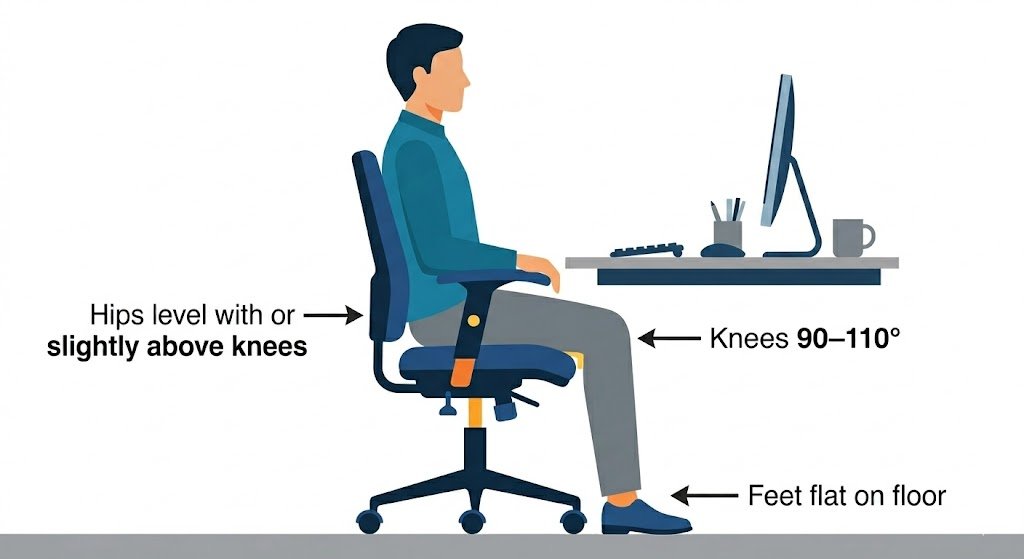
Step 1: Adjust Your Chair First
Why This Matters
Your chair determines elbow height. Elbow height determines desk height. Desk height determines monitor height.
If your chair is too low:
- Shoulders elevate
- Wrists extend
- Neck compensates
If your chair is too high:
- Feet lose contact with the floor
- Lumbar support becomes less effective
Workstation height relative to elbow position strongly influences upper‑limb loading (Rempel et al., 2007; Vergara & Page, 2002).
How to Set It
- Feet flat on the floor
- Knees around 90–110°
- Elbows around 90°
- Shoulders relaxed
Once your chair is correct, move on to the monitor.
Step 2: Set Monitor Height
Goal
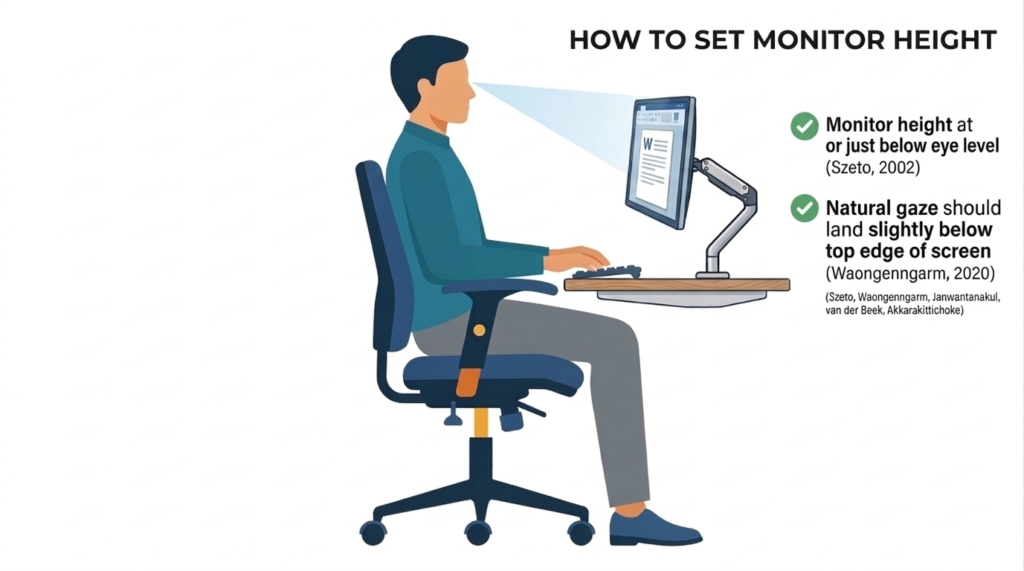
Position the top of your monitor at or just below eye level.
Why Monitor Height Matters
When a monitor is too low, you naturally flex your neck forward. Sustained neck flexion increases cervical muscle activation and discomfort (Szeto et al., 2002). Reviews confirm that prolonged non‑neutral posture is linked to musculoskeletal symptoms (Waongenngarm et al., 2020).
A correctly positioned monitor helps maintain a neutral neck posture, reducing cumulative strain across the cervical spine and upper trapezius.
How to Set It Correctly
- Sit upright with your chair adjusted.
- Look straight ahead.
- Your natural gaze should land slightly below the top edge of the screen.
- Adjust the monitor height until this alignment feels natural and relaxed.
If you wear bifocals or progressive lenses, you may need the monitor slightly lower.
Using Monitor Stands or Monitor Arms
If your monitor isn’t height‑adjustable, use one of the following:
Monitor Stand / Riser
A simple monitor stand lifts the screen to eye level. Ideal for fixed‑height monitors or budget setups.
Monitor Arm
A monitor arm provides the most ergonomic flexibility, allowing adjustments in:
- height
- depth
- tilt
- rotation
- lateral positioning
Monitor arms are especially helpful for:
- dual monitor setups
- deep desks
- standing desks
- users who switch tasks frequently
Both options help you achieve correct monitor height without compromising your chair or desk setup.
Step 3: Adjust Viewing Distance
Goal
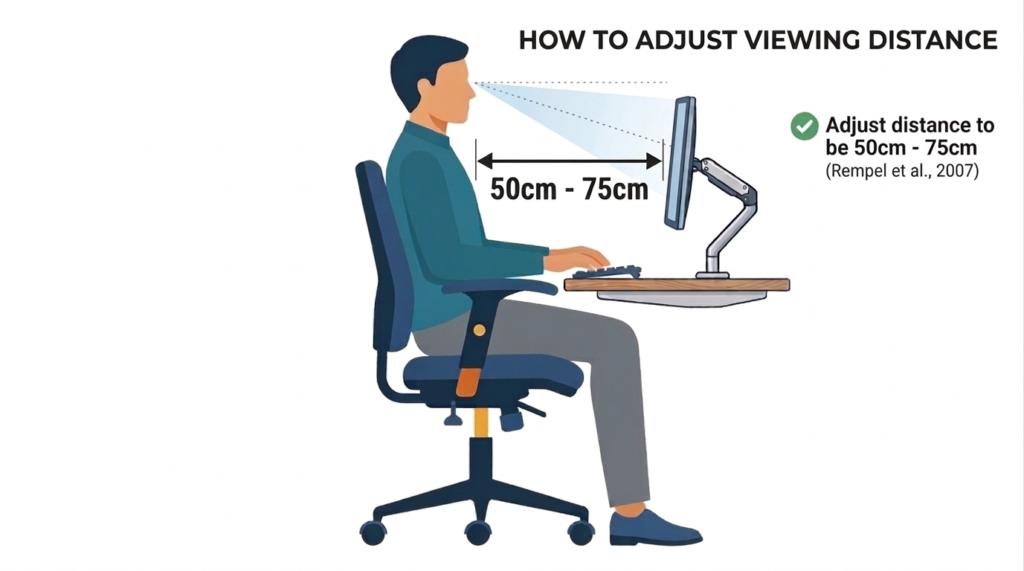
Position the monitor 50–75 cm away (Rempel et al., 2007) or about arm’s length.
Why It Matters
Screens that are too close increase visual demand and encourage forward head posture. Screens too far away cause leaning and squinting.
Optimising viewing distance reduces both visual strain and postural load.
How to Do It
Sit back in your chair and extend your arm. Your fingertips should just reach the screen.
Step 4: Centre the Monitor
Goal
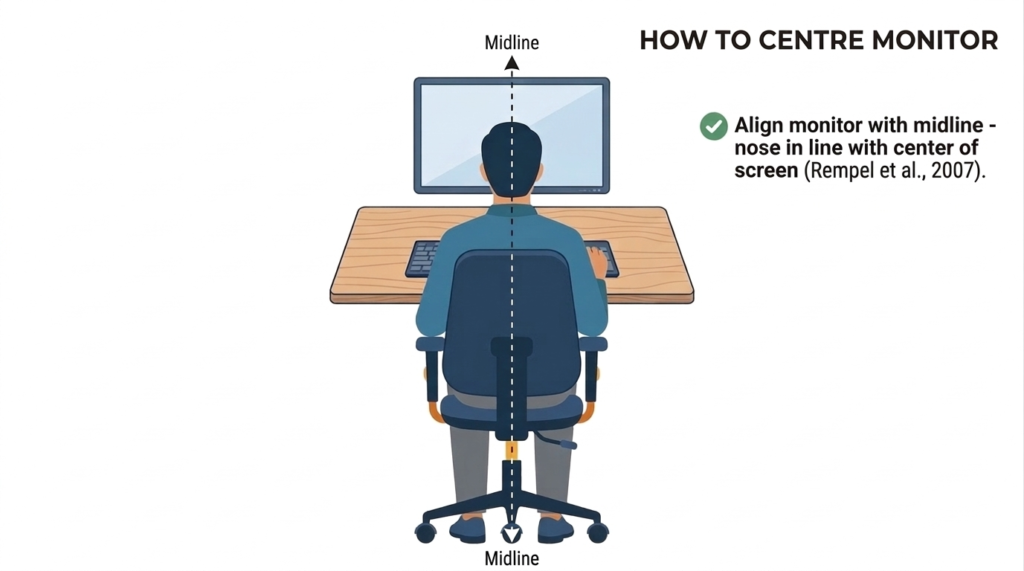
Align the monitor with your midline – nose in line with the centre of the screen.
Why It Matters
Repeated or sustained neck rotation increases asymmetric cervical loading (Rempel et al., 2007). Over time, this contributes to discomfort and muscle imbalance.
How to Do It
Line up:
- Chair
- Keyboard
- Monitor
They should form one straight line.
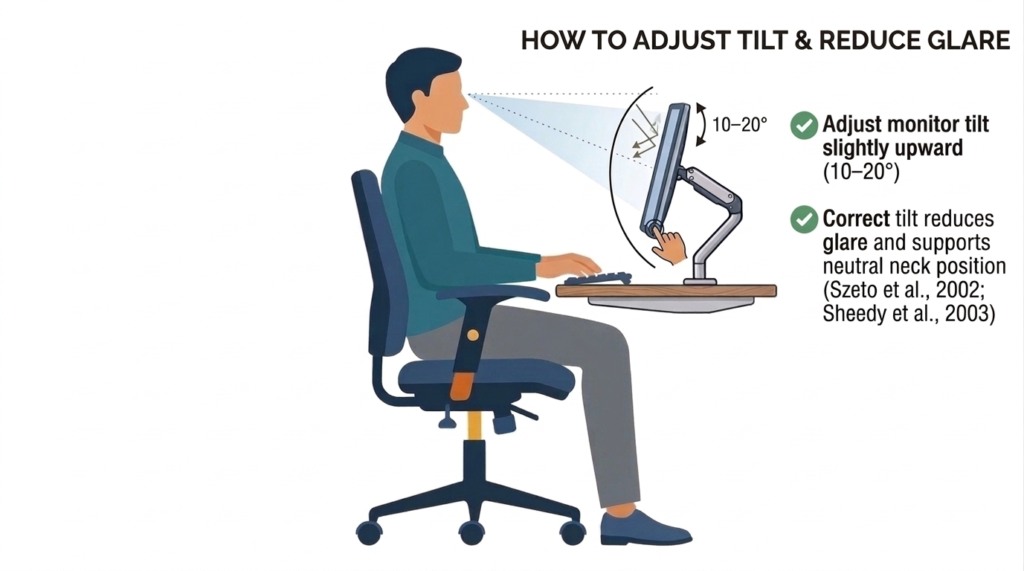
Step 5: Adjust Tilt and Reduce Glare
Goal
Tilt the monitor slightly upward (10–20°).
Why It Matters
Correct tilt reduces glare and supports neutral neck posture (Szeto et al., 2002). Visual discomfort can increase muscle tension (Sheedy et al., 2003).
How to Do It
If you find yourself leaning forward:
- Check for glare
- Adjust lighting
- Adjust monitor tilt before changing posture
Frequently Asked Questions
How Do I Position Dual Monitors?
If you use both equally:
- Place the centre seam directly in front of you
- Angle both screens slightly inward
If one monitor is primary:
- Place it directly in front
- Position the secondary monitor to the side
Avoid sustained neck rotation toward a side monitor.
Is Monitor Positioning Different for a Standing Desk?
The alignment principles are the same:
- Top of screen at eye level
- Screen centred
- Elbows around 90°
- Shoulders relaxed
Neutral posture matters more than whether you are sitting or standing.
What Should I Do With a Laptop?
Laptops combine the screen and keyboard, which forces neck flexion.
The best solution:
- Raise the laptop to eye level
- Use an external keyboard and mouse
Without this, maintaining neutral posture is difficult (Moffet et al., 2002).
Are Curved Monitors Better Ergonomically?
Curved monitors can offer visual advantages, particularly on wide or ultrawide displays. Research shows they may improve peripheral viewing, reduce visual distortion, and enhance subjective visual comfort.
However, current evidence does not show clear musculoskeletal benefits over flat monitors. Studies consistently find that while users may prefer curved screens, they do not significantly reduce neck flexion, shoulder load, or upper‑body muscle activity.
Correct monitor height, distance, and alignment remain far more important than screen shape.
Key Takeaways
- Adjust your chair first
- Top of monitor at or just below eye level
- Screen 50–75 cm away
- Monitor centred with your body
- Reduce glare before changing posture
- Correct positioning reduces cumulative neck and shoulder strain
Small setup changes make a big difference over months and years.
References
- Gerr, F., Marcus, M., Ensor, C., Kleinbaum, D., Cohen, S., Edwards, A., Gentry, E., Ortiz, D. J., & Monteilh, C. (2002). A prospective study of computer users: I. Study design and incidence of musculoskeletal symptoms and disorders. American Journal of Industrial Medicine, 41(4), 221–235. https://doi.org/10.1002/ajim.10066
- Moffet, H., Hagberg, M., Hansson-Risberg, E., & Karlqvist, L. (2002). Influence of laptop computer design and working position on physical exposure variables. Clinical Biomechanics, 17(5), 368–375. https://doi.org/10.1016/s0021-9290(02)00062-3
- Rempel, D., Barr, A., Brafman, D., & Young, E. (2007). The effect of six keyboard designs on wrist and forearm postures. Applied Ergonomics, 38(3), 293–298. https://doi.org/10.1016/j.apergo.2006.05.001
- Rempel, D., Willms, K., Anshel, J., Jaschinski, W., & Sheedy, J. (2007). The Effects of Visual Display Distance on Eye Accommodation, Head Posture, and Vision and Neck Symptoms. Human Factors: The Journal of the Human Factors and Ergonomics Society, 49(5), 830–838. https://doi.org/10.1518/001872007×230208
- SHEEDY, J. E., HAYES, J., & ENGLE, and J. (2003). Is all Asthenopia the Same? Optometry and Vision Science, 80(11), 732–739. https://doi.org/10.1097/00006324-200311000-00008
- Szeto, G. P., & Lee, R. (2002). An ergonomic evaluation comparing desktop, notebook, and subnotebook computers. Archives of Physical Medicine and Rehabilitation, 83(4), 527–532. https://doi.org/10.1053/apmr.2002.30627
- Vergara, M., & Page, Á. (2002). Relationship between comfort and back posture and mobility in sitting-posture. Applied Ergonomics, 33(1), 1–8. https://doi.org/10.1016/s0003-6870(01)00056-4
- Waongenngarm, P., van der Beek, A. J., Akkarakittichoke, N., & Janwantanakul, P. (2020). Perceived musculoskeletal discomfort and its association with postural shifts during 4-h prolonged sitting in office workers. Applied Ergonomics, 89, 103225. https://doi.org/10.1016/j.apergo.2020.103225