
Footrest Ergonomics: How to Choose & Use One Properly (Evidence-Based Guide)
A simple, clinically reviewed guide for office and home workers
Introduction – Why Footrest Ergonomics Matters & Who This Guide Is For
Feet dangling? Thighs pressed against the seat edge? Even after perfect chair adjustment, these common issues cause slouching, poor circulation, and extra lower-back strain.
Ergonomic research shows that unsupported feet or mismatched lower-limb support during prolonged sitting can increase forward head posture, lumbar flexion, and discomfort (Callaghan & McGill, 2001; Woo et al., 2016). A properly used footrest fixes this by keeping thighs parallel to the floor, knees at a healthy angle, and feet supported – without changing your chair height.
Who this guide is for
- Desk workers whose feet don’t reach the floor after setting correct chair height
- Shorter people (under ~165 cm) or those using higher desks
- Anyone experiencing pressure behind the knees, cold feet, leg swelling, or lower-back discomfort
- Taller people who raise their chair height and then lose foot support
- Remote workers improving comfort without replacing their setup
This guide builds on chair adjustment principles and shows how to correctly add a footrest using evidence-informed strategies.
Quick Wins – Relief in Under 60 Seconds
Try these quick fixes before buying anything:
- Use a sturdy box, stack of books, or a ream of paper as a temporary footrest
- Adjust it so your thighs stay roughly parallel to the floor
- Keep knees at ~90–110°
- Rest both feet flat (avoid crossing legs)
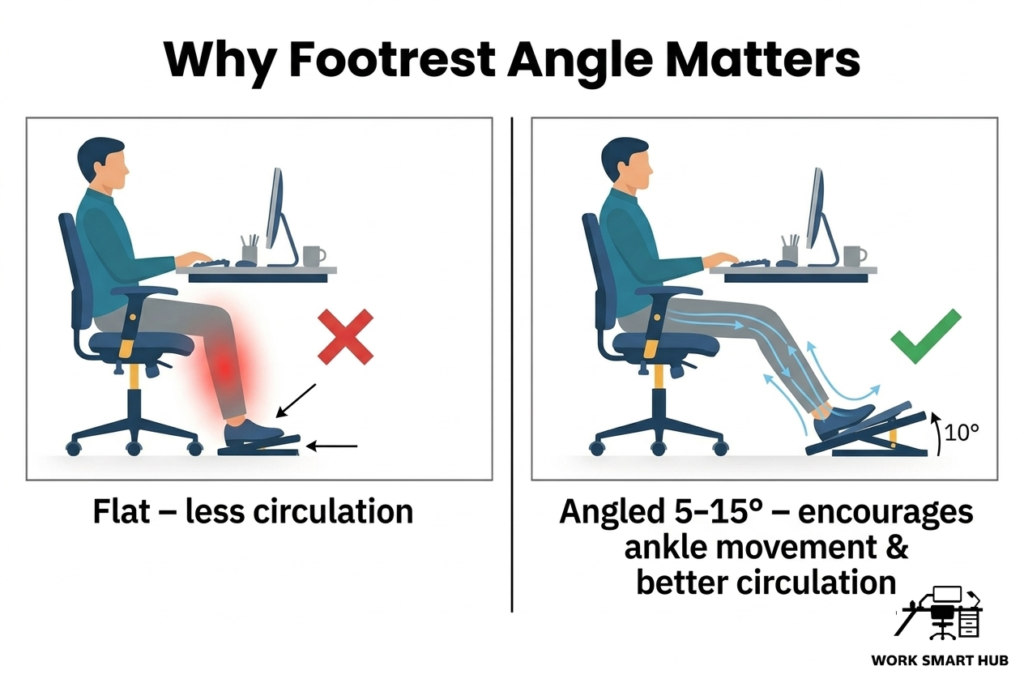
- Angle the surface slightly upward (about 5–10°) if possible
- Alternate foot position every 20–30 minutes
Even simple foot support can quickly reduce pressure under the thighs and improve sitting comfort.
Step-by-Step: How to Choose & Use a Footrest Properly
Step 1: Confirm You Actually Need One
After adjusting your chair so hips are level with or slightly above your knees:
- Feet dangling or barely touching the floor → footrest likely needed
- Pressure under thighs → footrest may help redistribute load
- Feet flat and comfortable → no footrest required
Ergonomic standards recommend full foot support as part of a neutral seated posture (ISO 9241-5; OSHA, 2024).
Step 2: Choose the Right Height & Angle
The top of the footrest should allow:
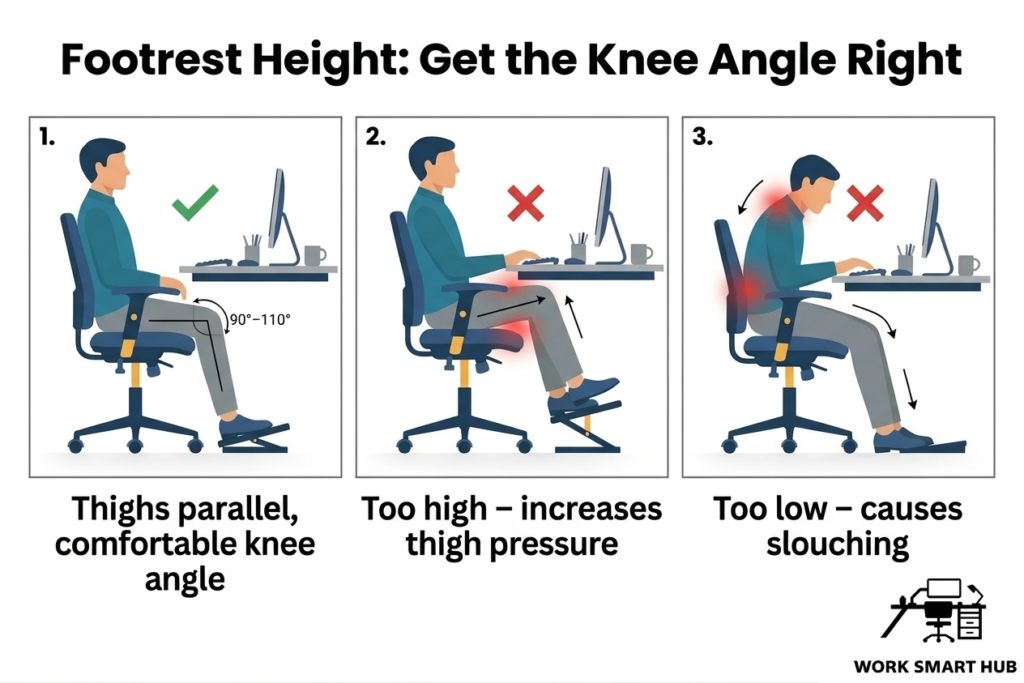
- Thighs parallel to the floor (or slightly sloping down)
- Knees at 90–110°
- 2–3 cm clearance behind the knees
General height guidance (adjust based on your setup):
- Shorter users (<165 cm): ~10–15 cm
- Average height (165–180 cm): ~5–10 cm
- Taller users (>180 cm): 0–5 cm (or none)
Test it: Sit normally – thighs should feel supported without upward slope. A slight upward angle (5–15°) improves comfort and encourages small ankle movements.
Step 3: Pick the Right Type
- Adjustable height/angle – best for most users
- Fixed – suitable if you know your required height
- Rocking/tilting – encourages small movements
- Non-slip surface – essential for safety
- Stable base – prevents shifting or wobbling
Footrests that allow movement may help reduce discomfort associated with static sitting by encouraging subtle lower-limb activity (Waongenngarm et al., 2018).
Step 4: Position & Use It Dynamically
Place the footrest centrally under your desk and make it part of your daily movement routine.
Key usage guidelines
- Start with both feet flat – heels touching the surface, thighs parallel
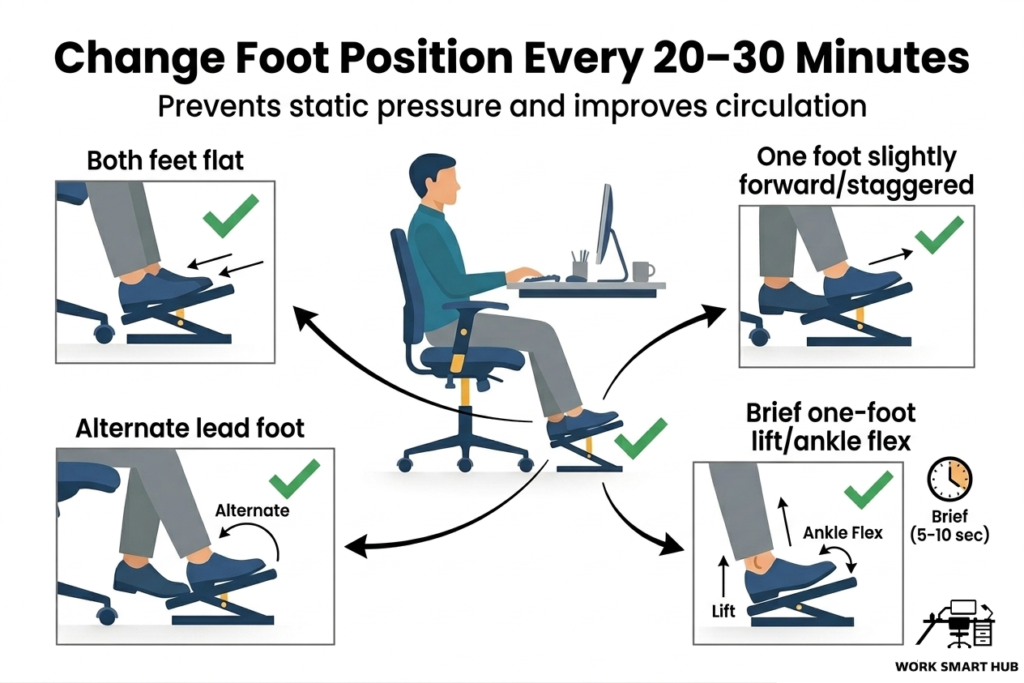
- Change position every 20–30 minutes to avoid static pressure:
- Staggered stance – one foot slightly forward, then swap
- Alternate lead foot – switch which foot is forward
- One foot lift – briefly raise one foot for 5–10 seconds, then switch
- Add small ankle movements – point/flex toes or circle ankles occasionally
- Pair with posture shifts – use footrest changes alongside the small posture adjustments from the Posture Variability guide
Dynamic foot positioning supports circulation, reduces numbness, and complements your movement breaks and posture habits (Waongenngarm et al., 2018).
Common Mistakes to Avoid
- Footrest too high (increases pressure under thighs)
- Keeping feet in one fixed position all day (leads to stiffness or numbness)
- Using unstable or poorly designed footrests
- Crossing legs (affects pelvic alignment)
- Treating footrest as a permanent fix instead of varying foot placement regularly
Frequently Asked Questions
Do I need a footrest if I have a standing desk?
Yes – when sitting. Elevated desk setups often increase the need for foot support.
Can I just use books or a box?
Temporarily, as long as it’s stable and positioned correctly. Ideally a transition to a footrest would occur once feasible.
What height should it be if I’m 5’2” / 6’2”?
Shorter users typically need more height (~10–15 cm), while taller users may need little or none. Always adjust based on thigh position and comfort.
Does a footrest help with leg swelling?
Yes – by reducing pressure under the thighs and encouraging movement, both of which support circulation (Waongenngarm et al., 2018).
Key Takeaways
- A footrest is useful when feet are unsupported after chair adjustment
- It should support the feet while keeping knees and thighs comfortable
- Height should be adjusted based on body size, not fixed rules
- Adjustable, stable, and angled designs work best
- Use it dynamically – change foot position regularly
- Works best alongside posture variability and movement breaks
These small additions can make a big difference in leg comfort and overall posture.
References
- Callaghan, J. P., & McGill, S. M. (2001). Low back joint loading and kinematics during standing and unsupported sitting. Ergonomics, 44(3), 280–294. https://doi.org/10.1080/00140130118276
- ISO 9241-5:2024 Ergonomics of human-system interaction – Part 5: Workstation layout and postural requirements. https://www.iso.org/standard/16883.html
- OSHA. (2020). Computer Workstations eTool. https://www.osha.gov/etools/computer-workstations
- Waongenngarm, P., Areerak, K., & Janwantanakul, P. (2018). The effects of breaks on low back pain, discomfort, and productivity in office workers. Applied Ergonomics, 68, 230–239. https://doi.org/10.1016/j.apergo.2017.12.003
- Woo, E. H. C., White, P., & Lai, C. W. K. (2016). Ergonomics standards and guidelines for computer workstation design and the impact on users’ health: A review. Ergonomics. https://doi.org/10.1080/00140139.2015.1076528